

Cloud Object Storage on a Single Platform
Drop in the Bucket and Store Limitlessly

Cloud Object Storage provides you with the unlimited storage, infinite scalability, and security you need.

Cloud Object Storage Storage Solution

Store Tetabytes of Digital Content at Lower Costs

A cloud storage solution that is software-defined, intuitive, and operates on a pay-per-use basis, supporting the S3 API for key-value databases. This offers you virtually limitless, flexible, and secure storage options.

User-friendly Management Portal
Highly Available Infrastructure
Limitless Scalability
Complex Access Key
S3 API & Erasure Coding

Plan the right backup storage size with confidence.

Use our calculators to estimate the recommended capacity for servers/VMs, shared folders, CCTV recordings, and Microsoft 365 based on your backup policy (retention, versions, and growth). Export an PDF result for easy budgeting, approval, and planning.

*This tool is for simulation purposes only, and the results provided are estimates.
Everbex is not responsible for any financial or operational decisions based on the outcomes of this calculator.

1) What are the Everbex Cloud Storage Calculators?

They are simple tools designed to help you estimate the recommended backup / storage capacity based on your data type and backup policy (retention, versions, growth, etc.). The output helps you plan the right storage size and budget before subscribing.

2) Why should I use these calculators?

Use them to:

  • Avoid under-sizing (backup fails / storage full / retention not met)

  • Avoid over-sizing (unnecessary cost)

  • Quickly compare different retention policies (e.g., 7 days vs 30 days vs 90 days)

  • Create an internal approval document by exporting an PDF report

3) When do I need to use a cloud storage calculator?

Use a calculator when you have any of these situations:

  • You are planning a new backup project (first time backup)

  • You want to move from on-prem storage/NAS to cloud/object storage

  • You are adjusting backup policy (longer retention, more versions, immutable/WORM)

  • Your storage is growing fast (new staff, new CCTV cameras, larger shared folders)

  • You need an estimate for budgeting / quotation / management approval

4) Which calculator should I use?

Use the one that matches your data source:

A) Server / VM Backup Calculator

  • For: Physical servers, VMware/Hyper-V VMs, application servers (File server, AD, SQL, ERP, etc.)

  • Goal: Estimate backup storage based on VM size, daily change rate, retention, and growth.

B) Shared Folder / File Share Calculator

  • For: NAS shared folders, Windows file server shares, department folders (HR/Finance/Sales)

  • Goal: Estimate storage based on total data size, daily file changes, versions, retention.

C) CCTV Video Storage Calculator

  • For: CCTV/NVR recording storage planning (cloud archive or backup)

  • Goal: Estimate storage by camera count, bitrate, hours/day, days of retention.

D) Microsoft 365 Backup Calculator

  • For: Exchange Online mailboxes, OneDrive, SharePoint, Teams data

  • Goal: Estimate backup storage based on user count / current usage and retention needs.

5) What information do I need to prepare before using the calculator?

Depending on calculator type, prepare:

  • Current data size (GB/TB) — e.g., VM disk size, shared folder size, M365 usage

  • Expected growth rate (monthly/yearly)

  • Backup retention target (e.g., 14/30/90 days)

  • Frequency (daily/weekly) and versions (if applicable)

  • For CCTV: camera count, resolution/bitrate, recording hours/day

6) What does “Recommended Storage Size” mean?

It is the estimated storage capacity you should allocate to meet your backup policy, including:

  • Data changes over time (incremental changes)

  • Retention/versions

  • Buffer for growth and safety margin (to reduce risk of storage full)

7) Is the calculator result a final guaranteed number?

It’s a planning estimate, not an exact measurement, because real usage depends on:

  • Actual daily change rate (database/log changes, file modifications)

  • Deduplication/compression behavior (if enabled in backup software)

  • CCTV bitrate fluctuations (scene changes / motion)

  • Microsoft 365 growth patterns (attachments, Teams recordings, SharePoint)

For accuracy, Everbex can help validate the estimate using real usage reports (backup job statistics, storage usage trend, or a short assessment).

8) When should I consider using Object Storage?

Object storage is suitable when you want:

  • Cost-effective storage for large backup data

  • Offsite protection (3-2-1 backup strategy)

  • Better durability and scalability

  • Optional immutability (WORM) for ransomware protection

Typical use cases: long-term retention, shared folder backup archive, M365 backup archive, and offsite backup copy.

9) Do these calculators support immutable (WORM) backup planning?

Yes—if your backup policy includes immutable retention, you can model longer retention and safer storage sizing. (Immutability may affect how long storage is locked and therefore capacity planning becomes more important.)

10) Can I export the results for documentation or quotation?

Yes. You can export an PDF report for:

  • Customer approval

  • Internal IT planning

  • Budget proposal

  • Quotation attachment


Note: Please email exported report to sales@everbex.com for Everbex BaaS quotation.
11) Who should use these calculators?

  • IT Managers / System Administrators

  • Finance/Admin (budget estimation)

  • Business owners planning data protection

  • Anyone planning backup, cloud storage, or retention policy changes

12) What if I’m not sure which policy is suitable?

A good starting point for SMEs:

  • Daily backup + 14–30 days retention for most servers/files

  • Longer retention (60–180 days) for compliance or audit

  • Consider 3-2-1 + immutable copy for ransomware resilience

If you share your target RPO/RTO and compliance needs, Everbex can recommend a policy suitable for your environment.

How Does Object Storage Work?

​Easy-to-Manage Storage for Unstructured Data

Object storage is built for scale, adapting to the storage needs of modern computing. As such, it helps you overcome the management complexity and data hierarchy limitations of file and block storage models. It is a flat file space that stores data as objects, adding metadata and unique identifiers to describe and locate them.

Structure and Function

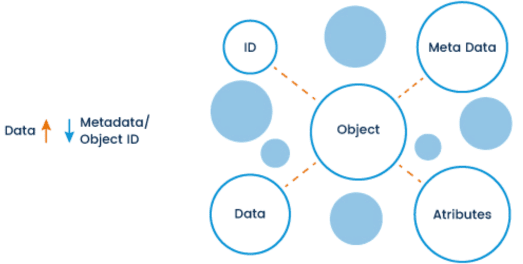
An object comprises the file, its ID, metadata, and attributes. Metadata contains file information, making it possible to search and index the object with increased performance. Attributes contain instructions for reading, writing, and deletion privileges.
Storage and Buckets

Objects are stored in buckets that can scale to hold billions of similar or related objects. The stored objects are further replicated to other buckets on physically separated devices in the cloud for additional redundancy and enhanced data integrity and security.
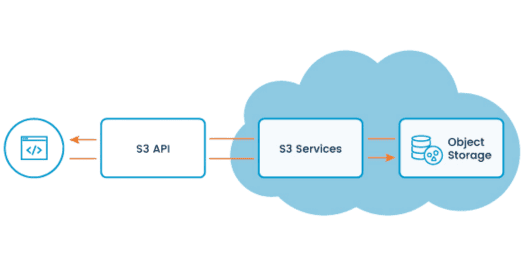
API Integration

The user interacts with the buckets via the industry-standard S3 API, working out of the box with most modern applications. The fact that the app is the storage client expands the ecosystem beyond a single OS and makes data more easily distributed across multiple platforms and storage devices.
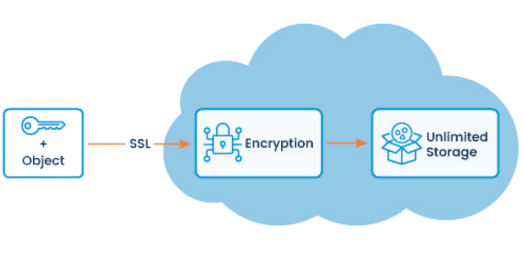
Data Encryption

The data written to the Object Storage is SSL-encrypted in transit and can be further encrypted at rest. For additional resilience, you can make your data immutable with the object lock function, replicate it across multiple nodes, or segment it with erasure coding for enterprise-level availability.

Why Do You Need Object Storage?

Object Storage Use Cases

Object Storage caters to the needs of Internet workloads such as web apps, websites, web hosting, or content delivery, making it easy to store, analyze, and extract insights from petabytes of unstructured data. With effectively limitless capacity, it is a secure storage tier for archiving volumes of growing data for compliance or regulatory purposes and a better alternative to traditional tape storage.

The S3 API enables rapid search, easy scaling, and instant data access across hybrid cloud and multi-cloud environments. This allows you to span your storage pool globally, supporting the needs of your cloud-native applications.

Media and Entertainment

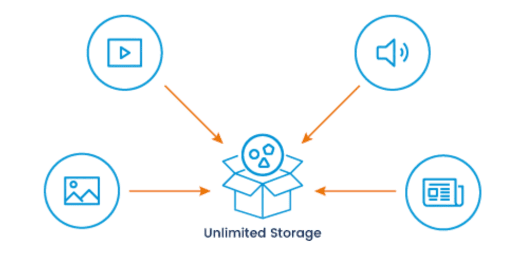
Use object storage to store, retrieve, and reuse high volumes of image, graphic, video, or audio files and make them accessible to your users anywhere in the world at lightning speed. Easily scale as your digital content grows and let your team leverage metadata for fast queries and faster postproduction.

Content Distribution and File Sharing

Take the load off your servers by moving your app’s downloadable assets such as media, software, video, or audio files to Object Storage. Support collaboration between geo-distributed teams with information access and privilege regulation, noting each modification in the metadata.

Big Data Analytics

Store and access massive datasets and let your ML or AI apps take full advantage of unmatched Object Storage scalability, robust APIs, and rich metadata. Collect global IoT data efficiently and cost-effectively in a single data pool, extracting value from it or using it to train your machine learning platform.

Sensitive Data Archiving

Object Storage is ideal for businesses that require reliable elastic storage to ensure compliance with long-term data retention policies and maintain low costs of these operations. Protect your medical scan records, video surveillance data, or other sensitive write-once-read-many assets.

Data Protection

Store backups of all kinds of immutable data securely and use Object Storage as a perfect way of achieving the 3-2-1 backup rule or implementing an affordable DR solution. Automated data replication lets you restore assets quickly, keeping your business operational in case a disaster strikes.

Static Website Hosting

Enhance the speed and availability of your static web pages with minimum investments and no software upgrades, web server configuration, security upkeep, or other maintenance tasks. Object storage provides an inexpensive way to host static web assets such as HTML, CSS, and JavaScript files.

Enable Immutability to Ensure Your Backups Are Tamper-Proof
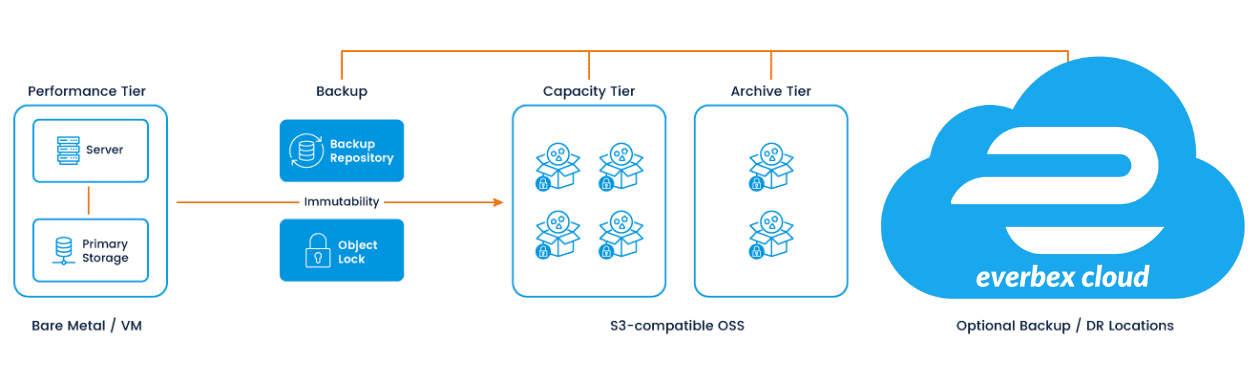
Everbex’s Veeam-compatible S3 cloud object storage to create a virtual air gap and bulletproof your critical backup data against ever-growing ransomware threats. Backups are essential for ensuring business continuity, which makes them increasingly attractive ransomware targets. Cybercriminals today rely on encrypting and deleting backup data first to cripple organizations’ ability to recover. This way, they make paying the ransom the only choice.

The Object Lock data immutability feature available in Veeam Backup & Replication V10 and above enables companies to prohibit any changes to the stored data for a specified amount of time. Backups are protected against accidental and malicious modifications to ensure their availability in case of a disaster. Even if cybercriminals manage to gain access to your backups, they won’t be able to delete or modify them as the Object Lock feature would keep them protected in an immutable state.

Tested for compatibility with:

Develops backup, disaster recovery and modern data protection software for virtual, physical and multi-cloud infrastructures.

Protect data on virtual, physical, cloud, and mobile platforms regardless of size or location. With disk-imaging backup, a business can capture backup images of its entire system, files, or data.

Frequently Asked Questions 
about EverbexCloud Object Storage

What is Object Storage?

Object storage is a type of data storage architecture that manages data as objects, as opposed to the traditional file-based or block-based storage systems. In object storage, each piece of data is assigned a unique identifier (usually a unique key), and the data and its metadata (attributes or tags describing the data) are stored together as a single object. These objects can be organized into containers or buckets.

What is Metadata?

Metadata refers to data that provides information about other data. It describes various aspects of a piece of information, helping users and systems understand its context, meaning, and characteristics. This data can help uniquely identify data collections based on where it came from, when it was made and who created it.

Who needs Object Storage Solutions?

Object Storage is suitable for storing unstructured data for backups, video streaming, image archiving, data analytics and so much more. If you aren’t sure if Object Storage is for you, TheGigabit’s Sales Team are ready to help discuss the best storage solution for your needs.

Contact Us for a Free Consultation

Contact us to leverage years of expertise and unwavering 24/7 support for tailored solutions - built just for you.


  • Allowed types : .pdf
    Maximum file size allowed is 2,048 KB
    If you use our calculator to calcuate the cloud object storage size, pPlease do attach the exported PDF